The 5 MUST-HAVE Drone Shots You NEED

Check out the Best Deals on Amazon for DJI Drones today!
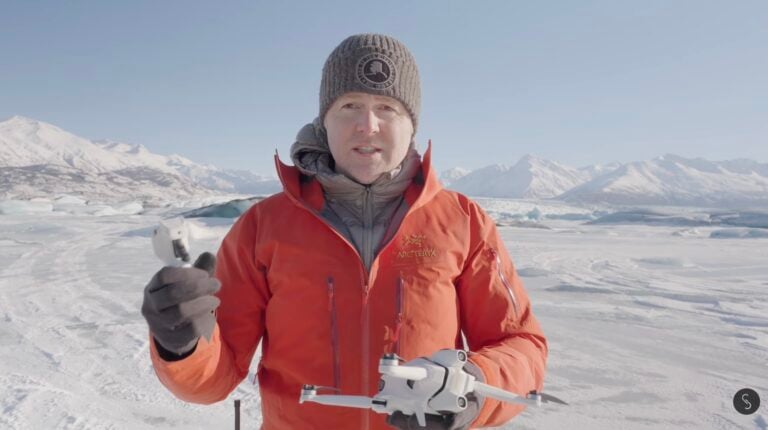
There are five types of shots that you really need to capture with a drone.

1. Establishing Shots
The first kind of shot I always capture with a drone is establishing shots. These are probably the most often thought of when using a drone, but these are your big, wide establishing shots that showcase the entire area that your video is going to be taking place in, or at least that the next scene is going to take place in. I guarantee that every TV show I’ve ever shot for, every big brand I’ve ever shot for, this is the go-to, even though it might seem to be the most boring. It is the go-to shot to use a drone for.
Orbits
So the couple of types of shots that you want to capture for an establishing shot are orbits. Really simple orbiting left, orbiting right, where your subject or your area stays in the center but the drone is arcing gently to the left or gently to the right. Orbits are great for establishing shots because they reveal a lot of information and showcase the whole entire area that your story, or at least the scene, is going to be taking place in.

Push-In Drone Shot
Another way to capture a great establishing shot is just doing a simple push in toward the area that your scene is going to be taking place in. A push in is great because it just gives you some movement and some motion. If you’re in a place like I am today where there’s not a lot of movement, not a lot of motion like cars or people or anything like that, you can actually speed ramp a push-in shot so long as your push-in is pretty steady and stable. You can speed ramp it to two times, which gives you the ability to move much faster through a much larger space like I’m in today, and it gives you the sense of movement and motion and pushing in towards something to set up the next few scenes that are going to happen in this location.

Tilt-up the gimbal
Another variation of the establishing shot is pushing in towards something and then tilting the gimbal from low to high. You start looking down and then slowly tilt up as you’re pushing in toward the area you’re going to be in. You can do this on orbit shots as well, and it adds a third field of motion or another way of motion that continues to reveal more information to your audience and makes the shot stay really interesting for a much longer period of time.
2. Transition Shots
The next type of shot that is fantastic to capture with drones are transition shots.
Tracking drone shots
There’s a lot of different ways you can do transition shots, but one of the most common is a tracking shot where you’re just following behind a subject as they move from one location to another. You can do tracking shots from behind, you can do tracking shots from in front, you can do tracking shots from the side.
From the side is probably one of my favorite ways to do a transition shot because it doesn’t reveal information about where you’re going necessarily or where you’ve been, which a tracking shot from behind or from in front does. A tracking shot from the side, or a truck shot tracking along with your subject, just gives a sense that you’re moving from point A to point B, and it gives a fantastic transition between two different locations.
There’s a couple of other ways you can do transition shots as well, especially if you’re going from a really big wide establishing shot to where you want to come in a little closer and show your subject in that scene.

Jib shot
One of the best ones for these is something like a jib shot, where you just go from high to low and come down to show and reveal your subject in the space. Or you go from low, where your subject is kind of big in the frame, and then pull straight up to reveal what’s beyond your subject there. That can also be a fantastic way to transition.
The best thing about transition shots is because they tend to be more of a medium shot, you’re somewhat closer to your subject where you’re seeing your subject much larger in the frame than something like an establishing shot. The fact is that you can get really creative with them. In this case here, I like to put something between my subject and myself because it gives lots of parallax or foreground movement, where things are coming in and out of frame and my subject is coming in and out of frame.
Slow Orbit Shot
Another great way to do a good transition shot is just doing a slow orbit around your subject as they’re moving from point A to point B. It just gives lots of motion, lots of movement. It’s fantastic for transitioning between locations and it gives a great sense of your subject’s journey from point A to point B.
Transition shots are really fun to play with. There’s almost limitless creativity on how you can capture them with drones and how you can combine the types of shots and different movements to get different types of transitions, but they are a ton of fun, almost as much fun as our next set of shots, which are reveal shots.
3. Reveal Shots
Reveal shots are something that I aim to do every time I’m out shooting on almost any type of shoot I’m doing. A reveal shot is just a great shot to be able to keep your audience interested, to place over A-roll and have some fantastic B-roll. Reveal shots tie in well with transition shots because they can be a transition shot, but reveal shots, in my opinion, are somewhat of a ball game of their own. You get some incredible imagery that’s really dynamic and has just a ton of stuff going on, which is a lot of fun.
In these examples here, as I’m revealing my subject and the area they’re walking into around these buildings, you can see just how much more exciting that shot is. If you have a drone that has a longer focal length lens, like an DJI Air 3, DJI Mavic 3 Pro, or an DJI Inspire, then a reveal shot can be really fun.
Look what happens when we go from the wide version of this shot to a 70mm version of this shot, or the 3x lens on the Mavic 3 Pro. It gets so much more dynamic and there’s so much more movement. It’s the same exact shot, same exact speeds, but you get a massively more dynamic shot because of that tighter focal length.

Reveal shots are something you can just have a ton of fun with. It basically is: find something to fly your drone around and reveal something beyond it, whether it’s your subject (like a character in your scene) or whether it’s just something beyond the building that you’re filming. It doesn’t matter.
Reveal shots are really fun to play with because they can be super dynamic, they can reveal lots of information to your audience, and they do keep people interested because by nature, you are constantly revealing more information to the people watching the video as you go through the reveal shot.
Reveal shots are ones that might take a little practice, but I have a trick for you if you’re wondering how I do these reveal shots by myself. I’m filming myself in a place like this without obstacle avoidance.
My trick, my key, my bonus tip (whatever you want to call it) is using waypoints. I did a whole video about using waypoints to do different types of reveal shots, but waypoints are one of my favorite ways to program reveal shots if I’m filming myself. If I’m not filming myself, I just generally fly everything manually, but you can watch the whole video on waypoints. It’ll be linked down in the description below.
4. Odd or Unusual Drone Shots
While I think reveal shots are my favorite just because they’re so dynamic, one of the most fun to capture are odd shots. Drones are fantastic for capturing odd or unusual shots because you can put the drone in a place that you just cannot put a normal camera.

One of the easiest ways to capture an odd or unusual shot is doing a top-down shot. Top-down shots add a perspective or give you a perspective that you just don’t see every day. It’s a fantastic way to show information to your audience and to showcase something happening. If you do an odd shot tracking from left to right or right to left, or tracking with your subject, it conveys your subject moving into a location, transitioning from one thing to another.

Odd shots are super useful for making your subject feel really small in a space, or adding maybe a little bit of an eerie flavor to it if you’re flying straight up or straight down toward your subject. Flying up and adding a twist, or rotating the drone as you fly up, can make something feel really eerie or really different, or add some tension to your video and really keep people interested and wondering what’s going to happen next if you’re adding that sort of odd shot, eerie flavor to it.

One of the TV shows I worked on a lot had me do an odd shot at every location because the show was about people who had been accused of very heinous crimes, through their court case, to see if they were convicted or proven innocent. An odd or unusual shot with a drone was something that was asked for every single time in every single location I ever shot for that show, and the top-down pull up twist around was definitely one of the go-tos that I had for every single time I was filming an odd shot.
But there’s a lot of other ways to capture odd or unusual shots. You can position a drone out over water in a place you couldn’t put a camera. That’s just a very cool, very unusual shot, like me walking across this bridge here. It just adds something very different and very unusual because you know how difficult it would be to get a camera to a location like that.

Odd shots are super fun and you can just experiment like crazy with them with the drone that you’re using to see what sort of odd angles or unusual shots you can capture.
5. Closing Shots
One more type of shot that I make sure and use a drone for almost every single time in almost every single shoot is the closing shot. A closing shot is super important to be able to bring resolution and closure to your whole video, whatever the story might have been.
Pulling straight back
The most simple closing type of shot you can do is just pulling straight back and straight away from the area that you were seeing just took place in. The closing shot is really important to be able to bring your audience into the fact that now the resolution has happened, the closing has happened.

In this case here, my friend had a knee injury just a few weeks or a month before this. She was in a leg brace and we’re going out to climb this iceberg. She wasn’t sure if she was going to be able to climb and get all the way on top of the iceberg because of the knee brace that she still had to wear.
So when she did get to the top, the best thing was starting close on my subject here and then pulling back to reveal the fact that she had conquered this iceberg, conquered her knee injury, and was now back fully in the game to be able to do all the outdoor sports that she loves to do, she and I both love to do.
Closing shots are super important and it’s a great way to release tension that you might have built up through the video, to show that your subject, your character, overcame whatever they might have had to overcome and now all of a sudden they’re victorious.
Closing shots are pretty simple. You can pull straight back out of an area, but because the motion is pulling away from the area your subject was in, it’s a pretty clear indication to your audience that the video is coming to a close, that that scene in that area is definitely done, and then you can move into a transition shot, or maybe it’s the end of the video.

Gimbal movement
You can start with a gimbal looking down and then as you pull back, tilt up and look away over the horizon, especially if you’re coming to the end of the video or you’re wanting to move into a very different type of scene next. You can also do something like what I showed you earlier, where you start tight on your subject and then pull away to reveal everything around them and keep pulling away as the credits roll, whatever it might be.
Closing shots are great to capture with drones because they communicate so much of the information that your audience wants to know, that whatever happened in that scene is now concluded and we’re moving on to the next scene, or depending on how you do the closing shot (like with my friend ice climbing), it basically caps the entire video saying, “Yeah, all the tension is released. She was able to overcome the injury, the leg brace and everything, and get on top and get back into the game doing the things she loves to do.”
Final Thoughts on MUST-HAVE Drone Shots
Hey, if you’re enjoying or getting value out of this video, then consider subscribing. My goal is to help solo creators like myself make good decisions when it comes to purchasing gear, but then also teach you the skills you need to make the most of that gear and create incredible content.
If you like the way this footage has looked, I put together an LUT pack for D-Log and D-Log M for the Mavic 3, the Air 3, the Mini 4 Pro, and some color grades as well. Check it out down in the description.

Next, you’re going to want to watch this video right here. I’ll see you over there. As always, if you have questions, ask me in the comments below or join my live stream, which happens most Wednesday nights from 4:00 PM Alaska time, 8:00 PM Eastern, where we can have more of a conversation. I can answer some questions I didn’t get to in this video. I’ll see you again soon in the next one. Cheers!
Discover more from DroneXL.co
Subscribe to get the latest posts sent to your email.
Check out our Classic Line of T-Shirts, Polos, Hoodies and more in our new store today!

MAKE YOUR VOICE HEARD
Proposed legislation threatens your ability to use drones for fun, work, and safety. The Drone Advocacy Alliance is fighting to ensure your voice is heard in these critical policy discussions.Join us and tell your elected officials to protect your right to fly.

Get your Part 107 Certificate
Pass the Part 107 test and take to the skies with the Pilot Institute. We have helped thousands of people become airplane and commercial drone pilots. Our courses are designed by industry experts to help you pass FAA tests and achieve your dreams.

Copyright © DroneXL.co 2026. All rights reserved. The content, images, and intellectual property on this website are protected by copyright law. Reproduction or distribution of any material without prior written permission from DroneXL.co is strictly prohibited. For permissions and inquiries, please contact us first. DroneXL.co is a proud partner of the Drone Advocacy Alliance. Be sure to check out DroneXL's sister site, EVXL.co, for all the latest news on electric vehicles.
FTC: DroneXL.co is an Amazon Associate and uses affiliate links that can generate income from qualifying purchases. We do not sell, share, rent out, or spam your email.