DJI Mini 5 Pro Vision Assist: The Safety Feature Every New Pilot Needs to Turn On

Check out the Best Deals on Amazon for DJI Drones today!
Good day folks. Shawn here from Air Photography. If you just picked up the DJI Mini 5 Pro, there is one safety feature you may not know about yet. It is called Vision Assist, and it can make a real difference in how safely you fly, especially when moving in reverse or sideways.
In this guide, I walk you through how to activate Vision Assist, what it shows you, and how to get the most out of it during flight. You can watch the full video below or keep reading for the breakdown.
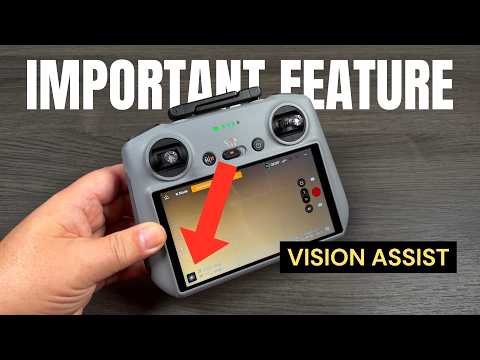
Vision Assist uses obstacle avoidance cameras to show your surroundings in real time
Vision Assist is a feature on the DJI Mini 5 Pro that uses the drone’s obstacle avoidance sensor cameras to give you a live view of your surroundings while flying. The feed appears as a black-and-white, low-resolution image on your controller screen, and it automatically switches direction based on how you move the drone.
To find it, look in the bottom left-hand corner of your controller screen. You can swipe through the available tools there, including the map, the compass, and Vision Assist. When the drone is on the ground, it will just say “view after takeoff.” Once you are in the air, the feed activates immediately.
If you have been following our DJI Mini 5 Pro beginner’s guide, you already know the basics. Vision Assist is the next step in building confidence during flight.
The automatic direction switching is where Vision Assist really helps
Here is what makes this feature so useful. When you fly forward, Vision Assist automatically shows the forward-facing view. Pull back on the sticks and fly in reverse, and the view instantly switches to show what is behind your drone. Fly sideways, and it shows the side-facing view.
This matters because flying in reverse is one of the riskiest things you can do as a drone pilot. You have no idea what is behind you. Yes, obstacle avoidance sensors are there to help, but they are not foolproof. Vision Assist gives you actual eyes in that direction, so you can spot obstacles before the sensors have to save you.
The same applies to sideways flight. You can line up your shot, keep your camera pointed at the subject, and still see what is coming up on the side. That is a big deal for getting cinematic shots without the stress.
I have been a fan of Vision Assist since DJI first introduced it on the Mavic 3 series, and later brought it to the Air 3 and Mini 4 Pro. Having it on the Mini 5 Pro means DJI’s entire modern consumer lineup now has this feature, and that is a good thing.
Full-screen mode, locked viewpoints, and movable windows add flexibility
You can tap on the Vision Assist window to go full screen. When you do, your live camera preview moves down to the small window in the bottom left corner. This is useful when you are flying through a tricky area and want the maximum view of your surroundings.
Tap the icon in the center of the screen and you get directional arrows. These let you manually switch between front, back, side, and even straight-down views. You can also look straight down, which can be helpful depending on your environment.
Want to lock a specific viewpoint? Press and hold any of those directional arrows. A small lock icon appears, and the view stays fixed on that direction regardless of which way you fly. To unlock, just tap it again.
There is one more trick that I find really handy. Press and hold the Vision Assist window itself, and you can drag it to any position on the screen. This decouples it from the dock, freeing up that bottom-left slot for another tool like the compass or the map. You still get your Vision Assist feed, just in a floating window that you can place wherever works best for your workflow. To put it back in the dock, tap the small down-arrow icon in the bottom left.
Why every Mini 5 Pro pilot should turn this on
Vision Assist is one of those features that does not get enough attention. It is not flashy. It does not make for exciting marketing videos. But it makes flying safer, period.
Obstacle avoidance is a great backup, but I do not want it to be my first line of defense. I want to see for myself what is around my drone. Vision Assist gives me that ability. It is especially valuable when I am flying in reverse for a reveal shot, or tracking a subject sideways through an area with trees or structures nearby.
If you are new to the DJI Mini 5 Pro, take five minutes to get familiar with this feature before your next flight. It could save your drone.
You can watch the full video on my Air Photography YouTube channel.
Discover more from DroneXL.co
Subscribe to get the latest posts sent to your email.
Check out our Classic Line of T-Shirts, Polos, Hoodies and more in our new store today!

MAKE YOUR VOICE HEARD
Proposed legislation threatens your ability to use drones for fun, work, and safety. The Drone Advocacy Alliance is fighting to ensure your voice is heard in these critical policy discussions.Join us and tell your elected officials to protect your right to fly.

Get your Part 107 Certificate
Pass the Part 107 test and take to the skies with the Pilot Institute. We have helped thousands of people become airplane and commercial drone pilots. Our courses are designed by industry experts to help you pass FAA tests and achieve your dreams.

Copyright © DroneXL.co 2026. All rights reserved. The content, images, and intellectual property on this website are protected by copyright law. Reproduction or distribution of any material without prior written permission from DroneXL.co is strictly prohibited. For permissions and inquiries, please contact us first. DroneXL.co is a proud partner of the Drone Advocacy Alliance. Be sure to check out DroneXL's sister site, EVXL.co, for all the latest news on electric vehicles.
FTC: DroneXL.co is an Amazon Associate and uses affiliate links that can generate income from qualifying purchases. We do not sell, share, rent out, or spam your email.