
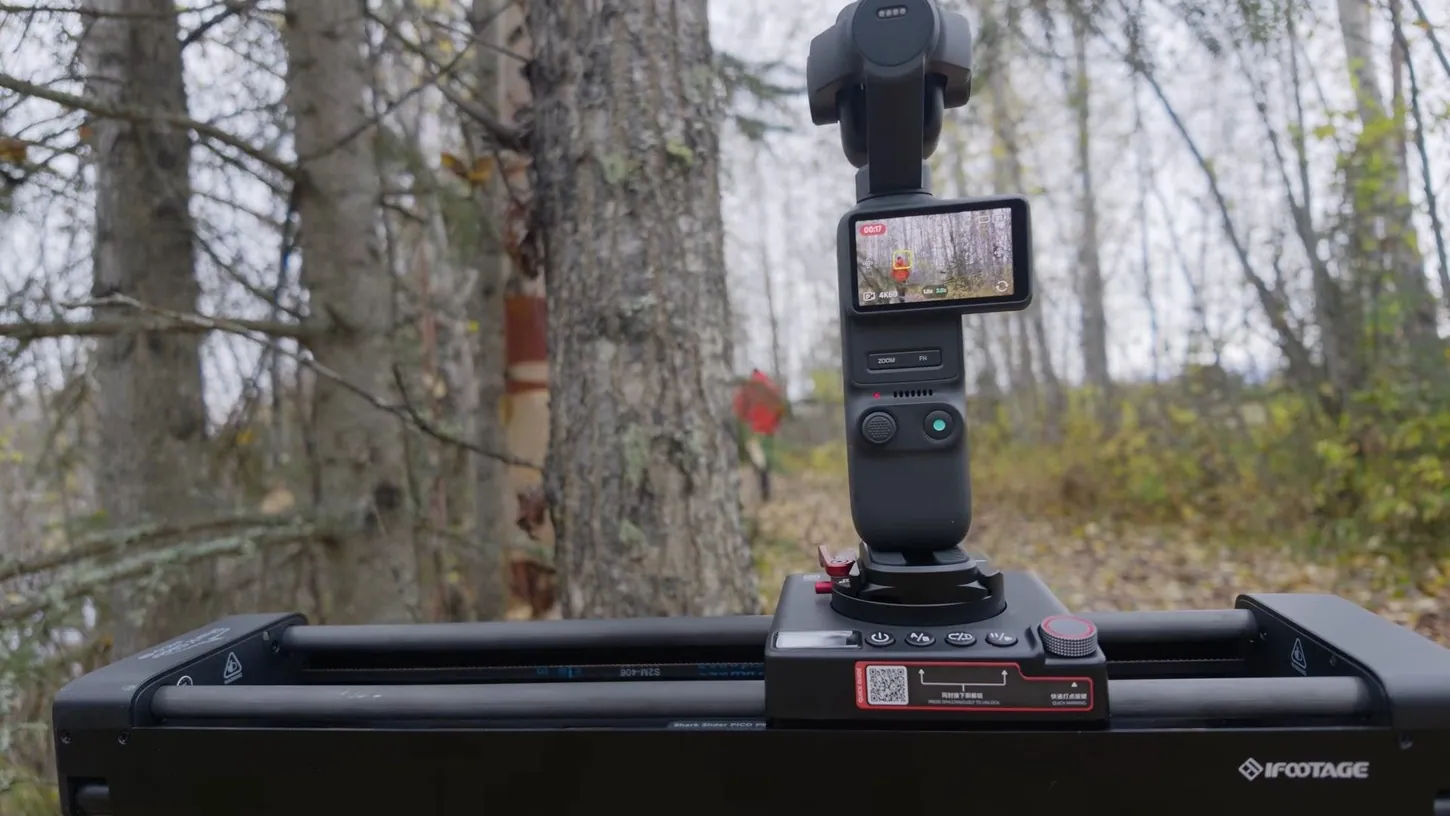
Take a look at the two shots that open my video. One is stationary: a nice shot, some out-of-focus areas, some good depth. The other has a subtle movement to the side, and that subtle movement is so easy to do with this slider from iFootage. Then there’s the shot where I walk through the woods, and you might think somebody else was filming me. Nobody was. Every one of those shots was done with the iFootage Shark Slider Pico Pro.
It is a really cool tool if you use action cameras, your phone, or especially any of the pocket cameras out there: the DJI Pocket 3, Pocket 4, Pocket 4P, and the Insta360 Luna Ultra and Luna Pro. Just so we’re clear, iFootage sent the Pico to me, but they are not paying me or sponsoring the video in any other way.
A Slider Small Enough to Live in My Backpack
When I first saw the Shark Slider Pico at NAB, I was pretty interested. I’ve used other sliders, including the Shark Slider Nano, its slightly bigger brother, and I’ve hiked all over the place with that thing, especially for time-lapses. The Pico is far smaller and lighter still.
It is incredibly small and lightweight, the batteries are built in, and the pocket cameras I now take everywhere, because they’re so much smaller and lighter than anything else I own, fit right on it. A little bit of movement in a shot, or in a time-lapse, makes a big difference.
Two Buttons Set Your A and B Points Without the App
One of the things that makes this slider so interesting to me is how easy it is to use. Push the AB and play/pause buttons together and it unlocks the carriage so you can move it by hand, slide it to your A point, then to your B point.
You can rotate the camera along the way if you like, and a little dial controls the speed. Typically you don’t want things at 100%. Push play/pause and it returns to the start. Turn looping on or off, hit go, and the slider moves between A and B until you tell it to stop. That’s great for basic left-to-right shots and simple pans with a GoPro, your phone, or any of the pocket cameras.
The Moco App Makes Every Move Repeatable
If you want to go deeper, into time-lapses, stop motion, or more interesting control of the camera and the slider, that’s where iFootage’s Moco app comes in. It connects quickly over Bluetooth, and you can set up to eight points with control over both the slide and the pan.
You choose between a smartphone and a regular camera, and there are modes for video, time-lapse, stop motion, panorama and multi-target. I found I had to turn the pan speed way down for it to be useful. Tap A to set your A point, move the slider and pan, set B, and then either pick a speed or set the time between points and let the app work out the speed. You can add a hold time too, so the camera reaches a point, pauses for ten seconds, and moves on to a C point with even more pan. Hit standby, preview if you want, and once it’s parked, hit go.
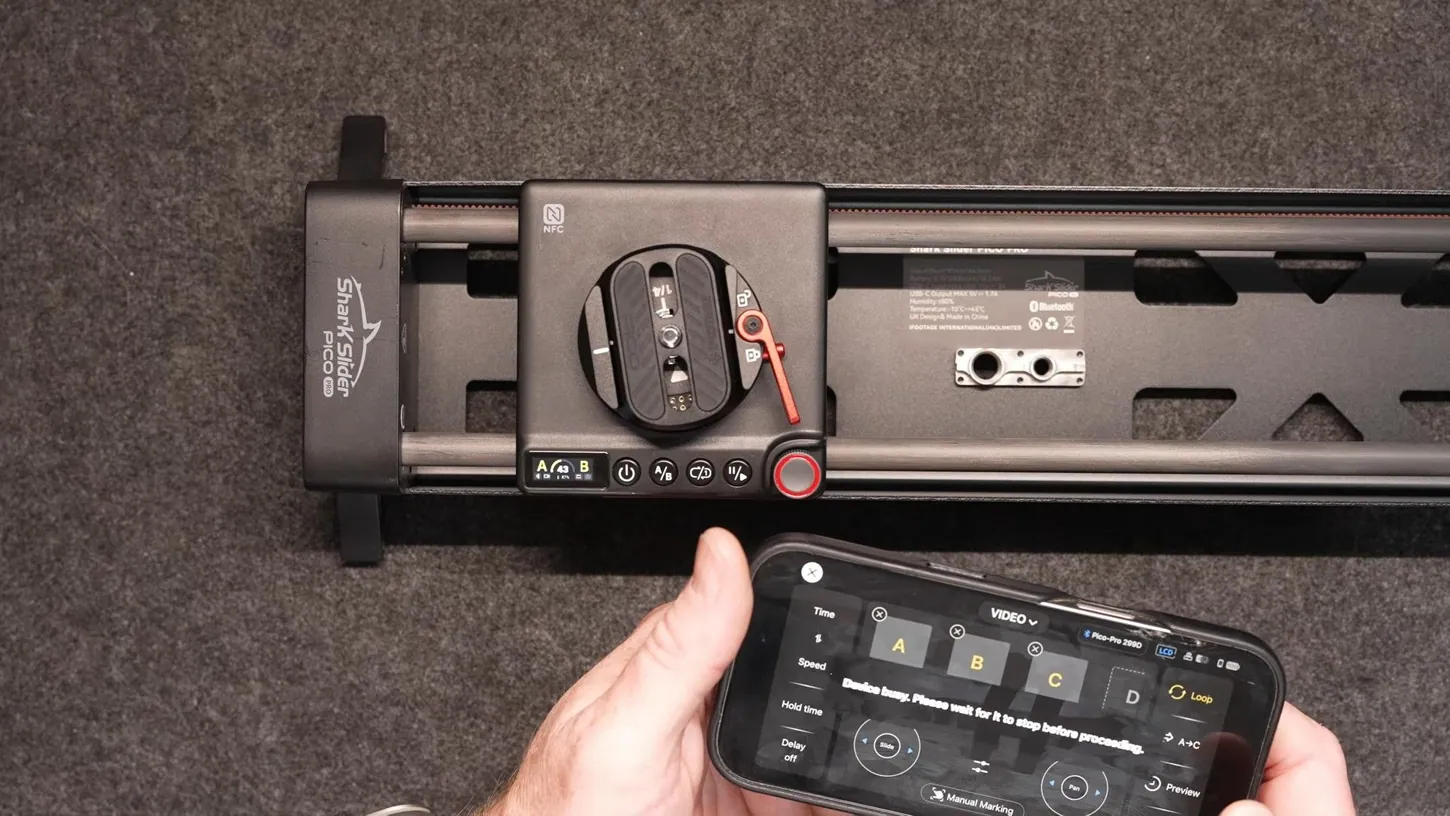
It performs the moves exactly as programmed, every single time. It’s basically keyframe accurate, so you can repeat a move between takes and line them up exactly. That’s how you get the effect where several versions of you share the same room. It’s also how I filmed the shots of the sensor inside my GoPro: with a macro lens on and the focus fixed, there was no way I could pull those off by hand.
Right now you have slide left and right and pan left and right. The Pro version of the Pico, as I understand it, has an arm accessory coming at some point that adds tilt, which would be useful with an action camera or a phone.
Plug In a DJI Pocket and the Slider Drives the Gimbal Too
Where this gets really interesting is when you run a USB-C cable from the Pico into a Pocket 3, Pocket 4 or Pocket 4P. Suddenly you’re controlling the pocket camera as well as the slider: slide left and right, then tilt up, tilt down, pan left, pan right, and zoom.
The zoom is a little jumpy, and after trying it I don’t think I’d use it personally, but maybe that gets ironed out in firmware. Set A and B as before, with the Pocket told to tilt down between them, and when you push play, the Pocket starts recording on its own and follows the moves exactly as programmed. Once I’d figured out my timing, I could let it run back and forth, do a couple of takes, and get some really cool results from this little slider and a Pocket 3, 4 or 4P.
Insta360 Luna Owners Get the Slide, Not the Integration
You can use the Pico with the Insta360 Luna Pro or Luna Ultra too, and even use the tracking in those cameras to add movement back and forth. It works well. One thing to be aware of: right now the integration with pocket gimbal cameras only works with DJI.
The Luna Ultra and Luna Pro don’t get any of it. I’m hoping that can be made possible with a firmware update, because the integration is really awesome. For now, with a Luna you’re limited to the slide and the gimbal pan, plus the camera’s own tracking, which is fantastic for that extra parallax in a shot.
The Pico Earns a Spot in a Solo Creator’s Bag
If you shoot product B-roll for YouTube reviews, want subtle movement in client videos or your own, or want more motion when you’re hiking so it looks like a second person is filming with you, the Pico can do a lot of that. It’s small enough for any camera bag.
It’s a ready-to-go package right out of the box, and price-wise it’s not bad either. I think it’s a couple of hundred on Amazon. I’ve really enjoyed playing with it, and I’m using it more and more, especially for product shots and for subtle motion in the studio when I’m shooting with an A and a B camera. It adds a lot to your ability to tell stories.
As always, if you have questions, ask me in the comments on my video, or join my live stream, most Wednesday nights at 4:00 p.m. Alaska time, 8:00 p.m. Eastern, where we can have more of a conversation.
This article is based on a video from our YouTube partner Jake Sloan. Watch the full video on the Jake Sloan YouTube channel, and find more of Jake’s work on his DroneXL author page.


