
Lexar Professional Silver Plus 1TB Review: Worth It?
Haye Kesteloo's hands-on Lexar Silver Plus 1TB review: measured speeds, DJI Mini 5 Pro and Antigravity A1 field tests, and why it never leaves his drone.
Last updated August 29, 2026 · Kept current by the DroneXL newsroom
The short answer: the Lexar Professional Silver Plus 1TB is faster than any consumer DJI drone can use, officially listed for the DJI Mini 5 Pro and Mavic 4 Pro, and durable enough that it can sit in an aircraft for months without a second thought. At $274.99 it is not the cheapest way to add a terabyte of storage, but it is the version that stopped me from thinking about storage at all, and that convenience is worth more than the benchmark numbers suggest.
I have run Lexar’s Silver Plus line for about a year, starting with the 256GB card, before Lexar sent the 1TB version for this review (disclosure below). I split the two cards across different drones to see how the line holds up: the 1TB stays in my Mini 5 Pro full time, while the 256GB flew in an Antigravity A1 during a weekend of testing at Croton Landing Park on the Hudson River. I originally covered this card in a June 2026 hands-on post; this page carries the full breakdown forward and stays updated as prices and DJI’s recommended lists change. The links on this page are affiliate links that support DroneXL at no extra cost to you.

What the Lexar Professional Silver Plus Is Built For
The Silver Plus is a UHS-I microSDXC card rated V30, U3, and A2, aimed at drone pilots, action camera shooters, and mobile creators who want fast, reliable storage the size of a fingernail. Held between two fingers, the 256GB and 1TB cards are physically identical apart from the printed capacity. Lexar positions the line below its UHS-II flagships on price and above entry-level cards on performance, and the 1TB is the top of that range.
Official Lexar Professional Silver Plus Specifications
These figures come from Lexar’s published product page for the Professional Silver Plus microSDXC UHS-I card; the 1TB part number is LMSSIPL001T-BNANU. Rated speeds run up to 205 MB/s read and up to 150 MB/s write across the 128GB through 1TB capacities, with only the 64GB model dropping to 100 MB/s write. Every capacity carries V30, U3, and A2 ratings, an included SD adapter, access to the Lexar Recovery Tool, and a limited lifetime warranty. One detail worth knowing before you buy: Lexar states that the full 205 MB/s read speed is best reached with its own RW310x reader, and pairing the card with a slower reader will bottleneck your offload speed even though the card itself is not at fault.
Why Write Speed, Not Read Speed, Matters for Recording
Write speed governs clean, uninterrupted video, and it is the number pilots most often overlook in favor of the read speed printed on the front of the card. The V30 rating guarantees a 30 MB/s write floor at all times, and that floor covers every consumer DJI drone on the market once you do the math: DJI quotes bitrates in megabits per second, storage is measured in megabytes, and dividing by eight shrinks the real demand dramatically. The highest figure among the drones covered here, the Mavic 3 Pro at 200 Mbps, works out to about 25 MB/s, comfortably under the Silver Plus’s 150 MB/s write ceiling. So the case for a faster card than you strictly need comes down to two things: quicker offload thanks to the 205 MB/s read rating, and the reliability that comes with a card built to a higher spec than the minimum.
Does the Silver Plus Work With Your DJI Drone?
It meets or exceeds the microSD requirement for every DJI drone below, and DJI’s own recommended card list already names it for two of them.
DJI Mini 4 Pro
DJI’s published list for the Mini 4 Pro still points to the older Lexar 1066x series rather than the Silver Plus. The Silver Plus is not yet named on that specific list, but it clears every technical requirement DJI states for the card slot.
DJI Mini 5 Pro
The Mini 5 Pro is one of two drones here where the Silver Plus is on DJI’s official recommended list. DJI publishes a 512GB microSD maximum for this model, so if you want to stay strictly inside the published spec, that is the ceiling to plan around; the drone’s 42GB of internal storage is a real backup for the day a card gets left at home.
DJI Air 3S
DJI’s Air 3S list currently names the Lexar 1066x rather than the Silver Plus, though the Silver Plus is a straight upgrade on every measurable spec. Worth knowing: the Air 3S encapsulates its 4K/120fps slow motion at 30fps, so the file’s parsed bitrate lands at roughly a quarter of the headline number.
DJI Mavic 3 Pro
The Mavic 3 Pro pushes the highest microSD bitrate of any drone here, 200 Mbps, which still only works out to 25 MB/s of sustained write. The Mavic 3 Pro Cine’s ProRes recording bypasses microSD entirely and runs to the internal SSD, so no card, Silver Plus included, touches those bitrates. For standard H.264 and H.265 recording, V30 is plenty.
DJI Mavic 4 Pro
The Mavic 4 Pro is the second drone where the Silver Plus sits on DJI’s recommended list, and it comes with a quirk few pilots expect. The Mavic 4 Pro’s microSD slot is hardware-limited to roughly 15 MB/s write, regardless of how fast the card is rated, so the card is never what is holding recording back. The 1,200 Mbps ALL-I mode skips the microSD slot altogether and records to the Creator Combo’s internal SSD instead.
DJI Drone microSD Quick Reference
| Drone | Highest microSD write demand | Silver Plus fit | On DJI’s recommended list |
|---|---|---|---|
| DJI Mini 4 Pro | Below the V30 floor | Exceeds requirements | Not yet (lists Lexar 1066x) |
| DJI Mini 5 Pro | Below the V30 floor | Exceeds requirements, 512GB DJI max | Yes |
| DJI Air 3S | Below the V30 floor | Exceeds requirements | Not yet (lists Lexar 1066x) |
| DJI Mavic 3 Pro | ~25 MB/s (200 Mbps) | Comfortably clears the ceiling | Not stated |
| DJI Mavic 4 Pro | ~15 MB/s (hardware-limited) | Card is not the bottleneck | Yes |
Field Test: 9 Flights and 130GB of 8K 360 Footage at Croton Landing
I spent a weekend at Croton Landing Park, a stretch of open Hudson River waterfront in Croton-on-Hudson, New York that rewards wide shots and long, slow pans. The Antigravity A1 carried the 256GB Silver Plus through 9 flights and 130GB of 8K 360-degree footage there, and the card kept up with every one of them. The A1 officially supports UHS-I V30 cards up to 1TB formatted in exFAT, so the 256GB sat well inside its supported range with speed to spare. The 1TB card, meanwhile, stayed in the Mini 5 Pro I used to shoot the product photos for this review.

Real-World Benchmark Results
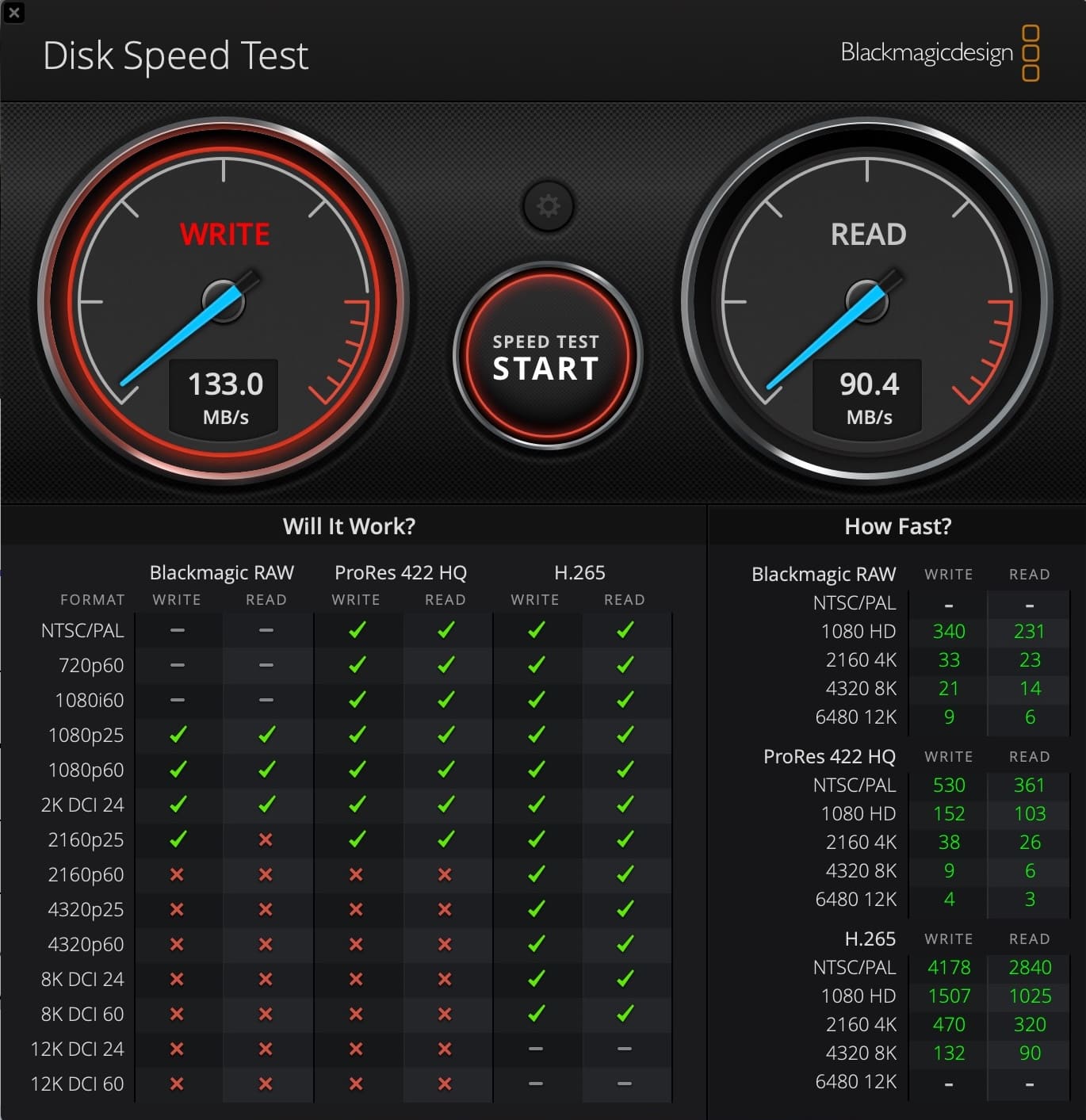
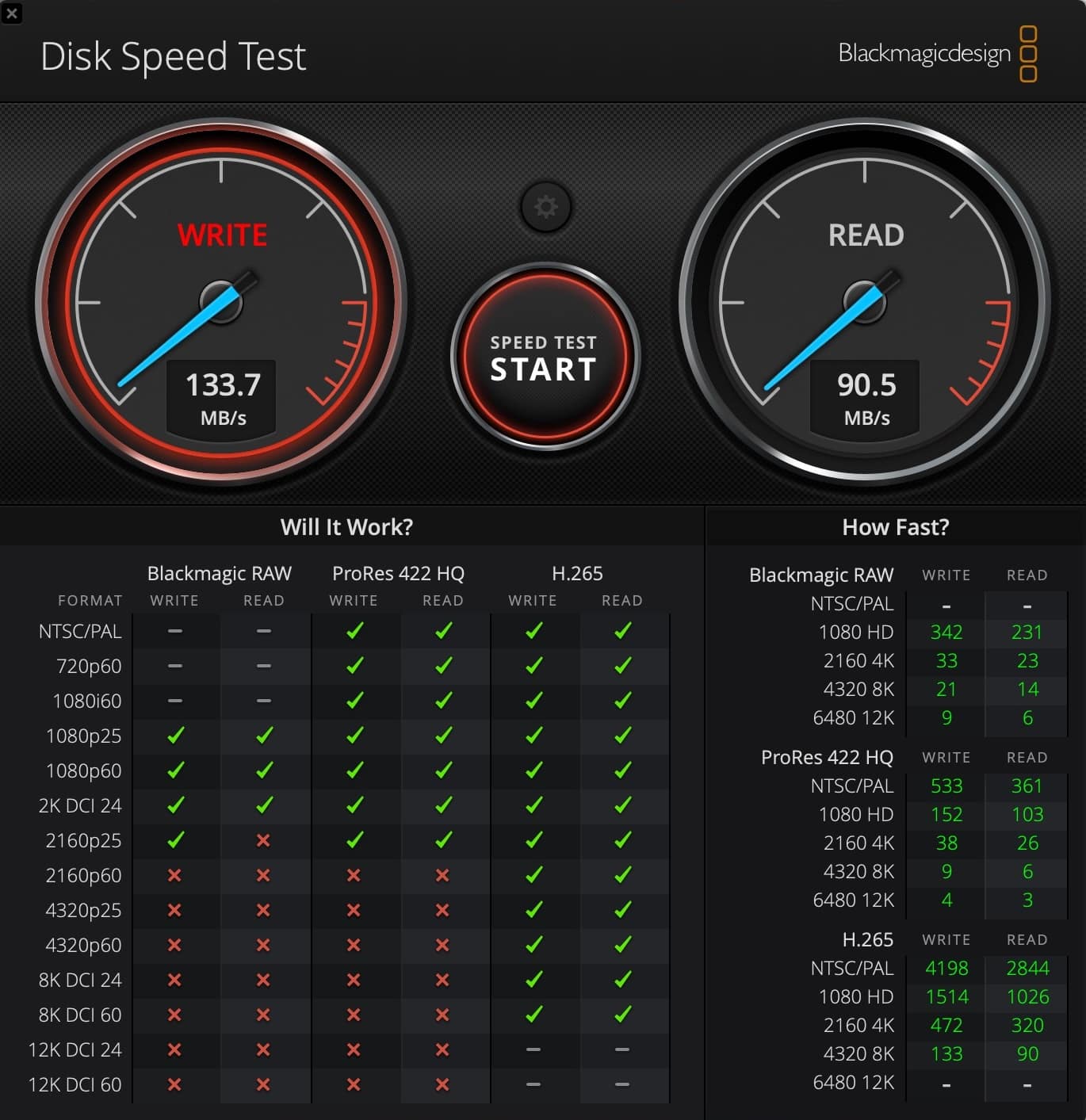
Rated numbers and real-world numbers are not always the same thing, and here they came close. Third-party benchmarks on the 128GB and 256GB Silver Plus cards measured 168 to 205 MB/s read and 143 to 182 MB/s write, matching or beating Lexar’s printed specs. A gap between rated and measured speed is normal and mostly reader-dependent, so do not be alarmed if your own numbers land a little under 205 MB/s on a different reader. Copying footage from the 256GB card to a Mac Studio M2 Max after the Croton Landing shoot produced transfer speeds close to the rated figures.
Why the 1TB Card Never Leaves My Mini 5 Pro
This is the part that changed how I think about storage. I do not swap this card out. I leave the 1TB Silver Plus seated in the Mini 5 Pro and let it act as a rolling backup of every flight, and at this drone’s recording bitrates a terabyte holds weeks, if not months, of flying before it fills. That means the last several months of footage are physically in the aircraft, separate from whatever has already been offloaded to a computer. With the 256GB card I stayed conscious of space on longer outings and offloaded out of habit. With 1TB installed, I stopped thinking about it, and for a recreational pilot or a solo creator away from a laptop for the day, that single change matters more than any number on the box.
One 1TB Card or Several Smaller Ones?
The 1TB Silver Plus costs more than several smaller cards combined, and there is a genuine argument on each side. The case for 1TB: roughly 10-plus hours of footage at 200 Mbps before the card fills, no mid-session swaps, and a single card to track and back up, which is usually enough for a full day at one location. The case for multiple cards: lose or corrupt one 1TB card and everything on it is gone, while two 512GB cards give a natural backup split, one battery’s footage on each card.
My own split follows the use case. For recreational flying and review work, the 1TB is liberating and I would not go back to swapping cards. For paid commercial shoots, where every frame is billable, carry at least two cards regardless of capacity; a redundant card is cheap insurance against a failure you cannot reshoot your way out of.
Best Practices for Running a Lexar microSD Card in Your Drone
A handful of habits keep Silver Plus cards healthy across hundreds of flights, and none of them are exotic. Format the card in the drone rather than on a computer, since letting the aircraft set its own file structure and formatting cleanly is a good early signal (the Antigravity A1, for one, prepares the card with the right parameters when formatted in-drone). Offload every clip and confirm it opens before wiping a card, treating the Lexar Recovery Tool as a last resort rather than a habit. Use a quality reader, since a cheap one is the single most common reason a fast card feels slow on offload; the Lexar RW310x is built to unlock the card’s full read speed. Give a cold card and drone a moment to warm up before high-bitrate winter recording, because cold is a leading cause of microSD failure even with a -25°C rating for margin. Power the drone down before removing a card so it never gets pulled mid-write, and store it in the included adapter case rather than loose in a bag. Keep firmware current, since card recognition and recording behavior can shift between firmware versions.
Is the Silver Plus Durable Enough for Field Use?
Its -25°C to 85°C operating range is the spec that matters most for drone work, since these cards fly in aircraft, get handled with cold fingers, and live in bags that take real abuse. Winter flying is hard on gear, and having margin on the temperature rating removes one variable to worry about when the air is below freezing.
What Does the Lexar Recovery Tool Do?
It is a free utility, included with every Silver Plus card, for recovering files that were accidentally deleted. For a pilot on a paid shoot who formats a card before fully offloading it, that is more than a nice extra: it is a real shot at getting most of the footage back.
Is the 1TB Card Worth the Price?
At Lexar’s published prices, the 1TB Silver Plus is the most efficient card per gigabyte in the line, ahead of both the 256GB and 512GB options. As of this writing it lists at $274.99, though prices and availability shift, so confirm the current figure before buying. That math flips the usual advice on its head: if you can use the capacity, 1TB is not a luxury tax, it is the best value size in the lineup.
Verdict
The Lexar Professional Silver Plus 1TB is the most capable UHS-I microSD card I have used for drone work. It offloads a full day of footage in minutes, holds up to genuine field conditions, and carries DJI’s official recommendation for both the Mini 5 Pro it lives in and the Mavic 4 Pro. The Antigravity A1 separately supports it up to 1TB. Is the full terabyte overkill for most recreational pilots? Probably, and the 256GB or 512GB size hits a friendlier price for casual flying. But for a full-day event, a multi-location shoot, or a trip where the laptop stays home, the 1TB removes the one variable you never want to manage mid-flight.
Rating: 9/10
Disclosure: Lexar provided the 1TB Silver Plus card for this review. The 256GB card used for comparison was purchased independently. All opinions are Haye’s own.
More DJI storage and gear coverage: the Mini 5 Pro accessories guide and the Mini 5 Pro deal tracker. For the rest of Haye Kesteloo’s reviews and coverage, see his DroneXL author page.
Frequently asked questions
Is the Lexar Professional Silver Plus fast enough for DJI drone video?
Yes. The V30 rating guarantees a 30 MB/s write floor, and the highest bitrate among the drones covered here, the Mavic 3 Pro at 200 Mbps, only demands about 25 MB/s of that. The Silver Plus rates up to 150 MB/s write, so no consumer DJI drone comes close to saturating it.
Is the Lexar Professional Silver Plus 1TB officially recommended for DJI drones?
It appears on DJI's own recommended card list for the Mini 5 Pro and the Mavic 4 Pro. It is not yet on the published lists for the Mini 4 Pro or Air 3S, which still reference the older Lexar 1066x, though it clears every technical requirement for both.
How fast is the Lexar Professional Silver Plus in real-world use?
Lexar rates it at up to 205 MB/s read and up to 150 MB/s write (100 MB/s write on the 64GB model only). Third-party benchmarks on the 128GB and 256GB cards measured 168 to 205 MB/s read and 143 to 182 MB/s write, matching or beating the printed numbers, with the gap coming down to reader quality.
Should I buy one 1TB microSD card or several smaller ones for my drone?
A single 1TB card holds roughly 10-plus hours of footage at 200 Mbps, skips mid-session swaps, and is one card to track and back up, which suits recreational flying well. For paid commercial shoots, carry at least two smaller cards instead, since losing or corrupting one 1TB card loses everything on it.
Does the DJI Mavic 4 Pro write to microSD at the Silver Plus card's full speed?
No. The Mavic 4 Pro's microSD slot is hardware-limited to roughly 15 MB/s write no matter how fast the card is rated, so the card is never the bottleneck there. Its fastest 1,200 Mbps ALL-I mode skips the microSD slot entirely and records straight to the Creator Combo's internal SSD.
What operating temperature does the Lexar Professional Silver Plus handle?
Lexar rates it from -25°C to 85°C, backed by a limited lifetime warranty. That cold-weather margin matters for winter flying, though it still pays to let a cold card and drone warm up briefly before pushing high-bitrate recording.
DroneXL uses automated tools to support research and source retrieval. All reporting and editorial perspectives are by Haye Kesteloo and the credited author.