
The Lexar Professional Silver Plus 1TB has quietly become the only microSD card I bother thinking about. It lives in my DJI Mini 5 Pro, and I fly for months without reaching for the bag of spares I used to carry. When Lexar asked me to review the 1TB version, I was already a year or so into running their 256GB Silver Plus as my daily card, so I knew the line. What I did not expect was how much a single capacity bump would change the way I fly.
I split the two cards across two very different drones. The 1TB stays in the Mini 5 Pro. The 256GB now lives in my Antigravity A1, the 8K 360-degree drone I took out for a weekend at Croton Landing Park on the Hudson River in Croton-on-Hudson, New York. I also fly a DJI Mavic 3 Pro, so I have a sense of how this card behaves across a wide spread of recording demands. The short version: the Silver Plus is faster than any of these drones needs for recording, durable enough for real field use, and in the 1TB size, large enough that I have stopped treating storage as something to manage mid-flight.
Held between two fingers, the 256GB and the 1TB are physically identical, fingernail-sized cards with the same Silver Plus label. The only printed difference is the capacity. Here is the full picture, specs included, plus how it fits the drones I actually fly.

The Lexar Professional Silver Plus Is a Premium UHS-I Card Built for Creators
The 1TB is the headline, and at $274.99 it is the card I now leave in the Mini 5 Pro full time. The Silver Plus is a UHS-I microSDXC card rated V30, U3, and A2, aimed at drone pilots, action camera shooters, and mobile creators who want reliable high-speed storage in a card the size of a fingernail. It sits below Lexar’s UHS-II flagships on price and above entry-level cards on performance.
Lexar rates the card at up to 205 MB/s read and up to 150 MB/s write across the 128GB through 1TB capacities. The 64GB is the only one that drops, to 100 MB/s write. The card ships with an SD adapter and access to the Lexar Recovery Tool, and carries a limited lifetime warranty.
Lexar Professional Silver Plus Official Specifications
Everything below comes from Lexar’s official product page for the Professional Silver Plus microSDXC UHS-I card. The 1TB part number is LMSSIPL001T-BNANU.
One detail worth knowing before you buy: Lexar notes that the full 205 MB/s read speed is best reached with the Lexar RW310x reader. Pair the card with a slower reader and you bottleneck the read performance, which matters the moment you sit down to offload footage.
Write Speed Is Not the Number Drone Pilots Should Chase
The most common storage mistake I see from drone pilots is chasing the read speed printed on the front of the card and assuming it governs recording. It does not. What governs clean, uninterrupted video is sustained write speed, and the V30 rating guarantees a minimum of 30 MB/s at all times. For every consumer DJI drone on the market, that floor is more than enough.
The reason is simple once you do the math. DJI quotes video bitrates in megabits per second. Storage is measured in megabytes. Divide the bitrate by eight and the real write demand shrinks dramatically.
The highest figure here, the Mavic 3 Pro at 200 Mbps, lands at 25 MB/s. That is below V30’s 30 MB/s floor and nowhere near the Silver Plus’s 150 MB/s write ceiling. So why buy a faster card at all? Two reasons. Read speed when you offload, and the reliability that comes with a quality card. The 205 MB/s read rating is what saves you minutes every time you copy 50 to 100GB off the card after a shoot.
DJI Drone Compatibility and Card Requirements
The Silver Plus meets or exceeds the card requirement for every DJI drone I fly, and it is officially listed on DJI’s recommended card list for two of them. Here is the model-by-model breakdown, drawn from DJI’s published specs.
DJI Mini 4 Pro
DJI’s recommended list for the Mini 4 Pro still references the older Lexar 1066x series. The Silver Plus is not yet on that specific list, but it clears every technical requirement DJI states.
DJI Mini 5 Pro
The Mini 5 Pro is one of the two drones in my kit where the Silver Plus appears on DJI’s official recommended list. DJI states a 512GB microSD maximum for this model, so if you want to stay strictly inside the published spec, that is the ceiling to keep in mind. The 42GB of internal storage is a genuine safety net the day you forget a card at home.
DJI Air 3S
DJI’s Air 3S list currently shows the Lexar 1066x rather than the Silver Plus. In practice the Silver Plus is a straight upgrade on every measurable spec. Worth noting that the Air 3S records its 4K/120fps slow motion in files encapsulated at 30fps, so the parsed file bitrate is roughly a quarter of the headline number.
DJI Mavic 3 Pro
The Mavic 3 Pro pushes the highest microSD bitrate of any drone here at 200 Mbps, which still only works out to 25 MB/s. One thing to be clear about: the Mavic 3 Pro Cine’s ProRes recording runs to the internal SSD. No microSD card, Silver Plus included, can take those bitrates. For standard H.264 and H.265 recording, V30 is plenty.
DJI Mavic 4 Pro
The Mavic 4 Pro is the other drone where the Silver Plus sits on DJI’s recommended list. There is a quirk here that nobody warns you about. The Mavic 4 Pro’s microSD slot is hardware-limited to roughly 15 MB/s write, regardless of how fast the card is rated. The card is not the bottleneck. The drone’s own interface is. And if you want the 1,200 Mbps ALL-I mode, that runs to the Creator Combo’s internal SSD, not the microSD slot.
DJI Storage Card Quick Reference
This table puts every drone in my bag side by side, including the Mini 4 Pro, so you can match a card to your aircraft at a glance.
In the Field: A Weekend at Croton Landing
I spent a weekend at Croton Landing Park on the Hudson, a stretch of open waterfront that rewards wide shots and long, slow pans. The drone I flew there was the Antigravity A1, with the 256GB Silver Plus seated in it, capturing 8K 360-degree footage. The A1 officially takes UHS-I V30 cards up to 1TB formatted in exFAT, so the 256GB sits comfortably inside its supported range with speed to spare. The 1TB card, meanwhile, was in the Mini 5 Pro I used for the product shots you see here.

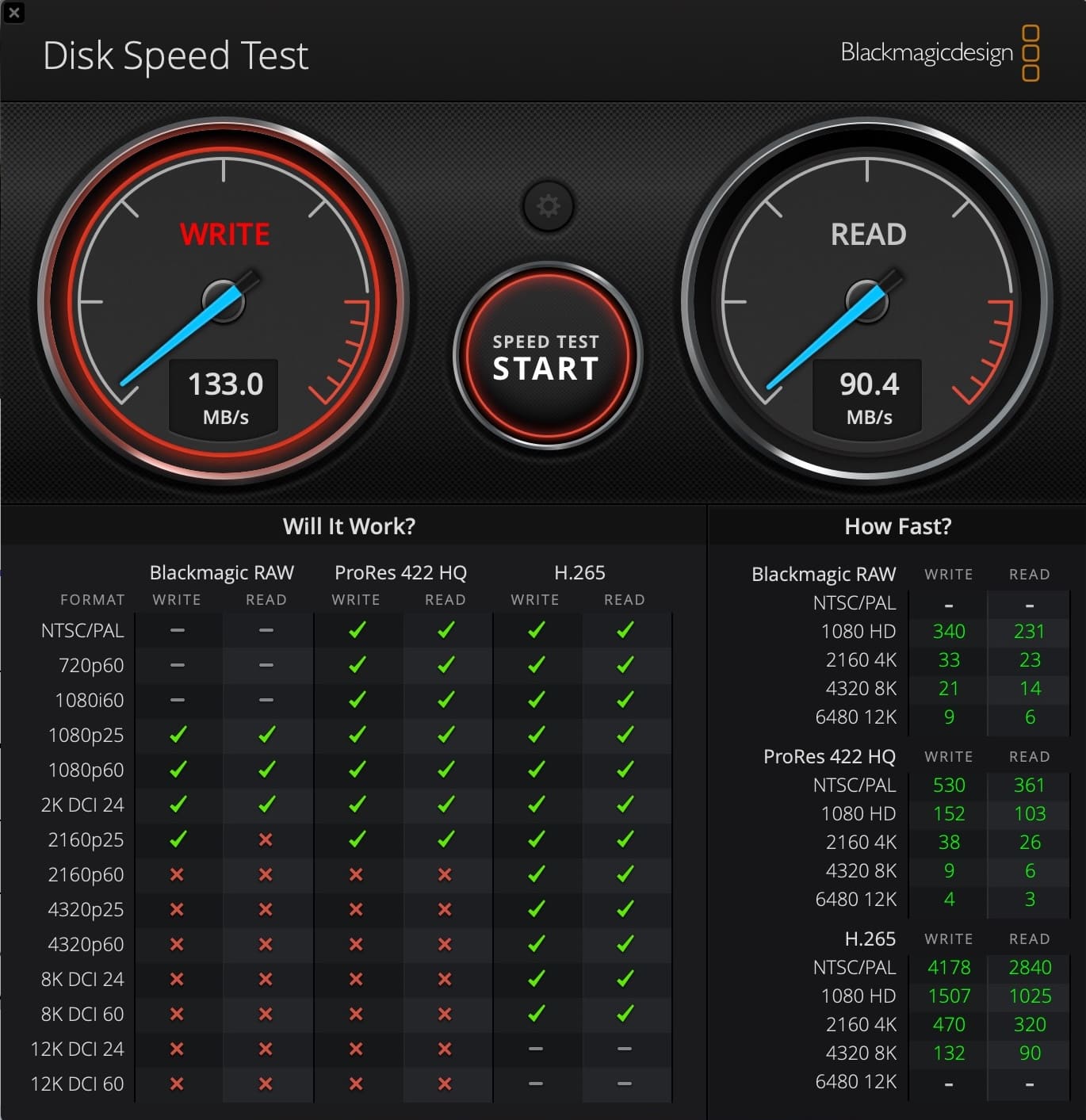
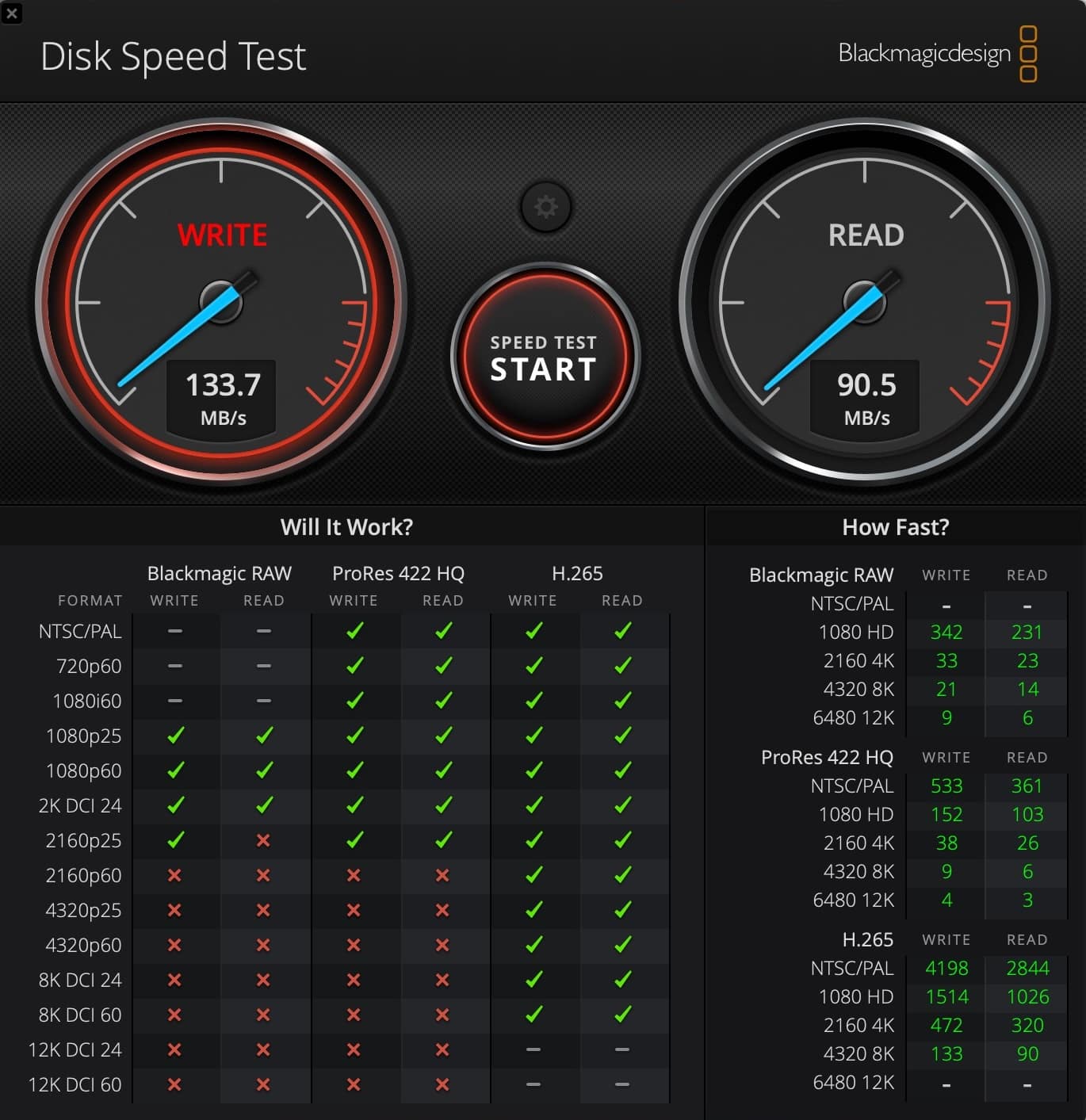
Real-World Speed Results
For reference, third-party benchmarks on the 128GB and 256GB Silver Plus cards have reported real-world results in the range of 168 to 205 MB/s read and 143 to 182 MB/s write, matching or beating the rated numbers. A gap between rated and real-world speed is normal and reader-dependent, so do not be alarmed if your figures land a little under the printed 205 MB/s.
Why the 1TB Card Lives in My Mini 5 Pro Full Time
This is the part of the review that changed how I think about storage. I do not swap this card out. I leave the 1TB Silver Plus seated in the Mini 5 Pro and let it act as a rolling backup of every flight. At this drone’s recording bitrates, a terabyte holds weeks, if not months, of my flying before it fills, so I always have the last several months of footage physically in the aircraft, separate from whatever I have already offloaded to the Mac.
That convenience is the whole pitch. With the 256GB card I was conscious of space on longer outings and offloaded more often out of habit. With 1TB I stopped thinking about it. For a recreational pilot or a solo creator covering a long day away from a computer, that single change is worth more than any benchmark number.
One Big Card or Several Smaller Ones
The debate worth having is whether one 1TB card beats a stack of 256GB cards. At $274.99 the 1TB costs more than several smaller cards combined, and there is a real argument on each side.
- The case for 1TB: roughly 10-plus hours of footage at 200 Mbps before the card fills, no mid-session swaps, one card to back up and track, and for a day at a single location you will almost certainly never run out of space.
- The case for multiple cards: lose or corrupt one 1TB card and you lose everything on it, while two 512GB cards give you a natural backup split, first battery on card one, second on card two.
My honest recommendation splits by use case. For recreational flying and review work like this, the 1TB is liberating and I would not go back. For paid commercial shoots where every frame is billable, carry at least two cards no matter the capacity. The eggs-in-one-basket risk is real, and a redundant card is cheap insurance against a card failure you cannot reshoot your way out of.

Best Practices for Running Lexar microSD Cards in Your Drone
A few habits keep my Silver Plus cards healthy across hundreds of flights. None of these are exotic. They are the difference between a card that lasts years and one that throws a write error at the worst moment.
- Format in the drone, not on the computer. Let the aircraft format the card to its own file structure before a serious shoot, and note whether it formats cleanly. The A1, for instance, prepares the card with the right parameters when you format in-drone.
- Offload before you format. Pull every clip to the Mac and verify it opens before you wipe the card. The Lexar Recovery Tool can rescue accidentally deleted files, but the safe move is to never need it.
- Use a quality reader. The Lexar RW310x unlocks the card’s full read speed. A cheap reader is the single most common reason a fast card feels slow on offload.
- Respect cold weather. The -25°C operating rating gives real margin, but let a cold card and drone warm slightly before pushing high-bitrate recording in winter, since cold is a leading cause of microSD failure.
- Eject properly. Power the drone down before removing the card so you never pull it mid-write, and store it in the included adapter case rather than loose in a bag.
- Keep firmware current. Card recognition and recording behavior can shift between firmware versions, so update before a shoot you cannot repeat.
Durability That Earns Its Place in the Field
The Silver Plus carries a durability spec list that reads like overkill until you remember these cards go up in aircraft, get handled with cold fingers, and live in bags that take abuse. For drone use the ratings are genuinely relevant.
That -25°C operating floor is the one I care about most. Winter flying over the Hudson is hard on gear, and a temperature rating with margin is one less variable to worry about when the air is below freezing.
The Lexar Recovery Tool
The card ships with access to the Lexar Recovery Tool, a free utility for recovering accidentally deleted files. For a pilot on a paid shoot this is more than a nice extra. Format a card before offloading and the Recovery Tool gives you a real shot at getting most of it back.
Price and Value
Here the 1TB is the most efficient card per gigabyte at Lexar’s published prices, edging out the 256GB and 512GB. That math flips the usual advice. If you can use the capacity, the 1TB is not a luxury tax, it is the best value in the lineup. Prices and availability shift, so confirm current pricing before you buy.
Verdict
The Lexar Professional Silver Plus 1TB is the most capable UHS-I microSD card I have used for drone work. It is fast enough to offload a full day of footage in minutes, durable enough for genuine field conditions, and the line carries DJI’s official seal of approval for the Mini 5 Pro it lives in (DJI also lists it for the Mavic 4 Pro). The Antigravity A1 separately supports it up to 1TB.
At Croton Landing I ran the 256GB in the Antigravity A1 and it performed just as you would expect across 9 flights and 130 GB of 8K 360 footage, with transfer speeds back to the Mac Studio M2 Max that were close to spec.
Is the 1TB overkill for most recreational pilots? Probably, and the 256GB or 512GB hits a friendlier price. But for a full-day event, a multi-location shoot, or a trip where a laptop stays home, 1TB removes the one variable you never want to think about mid-flight. It is the card that now lives in my Mini 5 Pro between flights.
Rating: 9/10
DroneXL’s Take
Storage is the unglamorous side of this hobby. Nobody buys a drone for its microSD slot. But a card failure mid-flight does not just cost footage. It can throw a recording error that forces you to land, or leave you staring at corrupted clips from light you cannot recreate.
What the Silver Plus 1TB really changed for me is a habit, not a spec. I stopped swapping cards. Leaving a terabyte in the Mini 5 Pro as a rolling backup of the last several months of flights is the kind of small workflow shift you only appreciate after living with it. The card being officially listed for the DJI Mavic 4 Pro and the DJI Mini 5 Pro is a nice citable bonus, but the reason it stays in the aircraft is convenience, not the logo on DJI’s list.
The detail I want to flag for anyone hesitating on capacity is that DJI itself resolves the old 512GB question. Some retail spec blurbs still list the Mini 5 Pro at a 512GB microSD maximum, but DJI’s own recommended card list names the Lexar Silver Plus in 1TB for this drone, and reviewers confirm 1TB cards work in practice. So the card in my Mini 5 Pro is not a working-but-above-spec gamble. It is on the list DJI published. The card meets every requirement that actually governs recording, and for the way I fly, that settles it. For more on the drone I run it in, see DroneXL’s DJI Mini 5 Pro coverage.
Source: Lexar Professional Silver Plus product page, DJI published specifications.
Disclosure: Lexar provided the 1TB Silver Plus card for review. The 256GB card used for comparison was purchased independently. All opinions are my own.


