You might be surprised to learn that there are a couple of ways the Action 6 still beats the GoPro Mission 1 Pro, but let’s go test, compare, and find out exactly what those ways are.
And just so we’re clear, I was sent both of these cameras by their respective manufacturers to test and review them, but this video had nothing to do with that and it is not sponsored. And if you’re interested in picking either of these cameras up, there are affiliate links in the description and if you use the code Ranger 10 on GoPro.com, you’ll save an additional 10%.
Image Quality Comparisons
We have to start off by talking about image quality because there’s a lot to unpack here. Now, both of these cameras on paper are capable of 8K because they’re both sporting quad Bayer sensors. The Action 6 has a 1/1.1in sensor, so it’s just slightly smaller than a 1-inch sensor, but it does film 8K 30 that actually looks pretty nice and has a pretty decent amount of detail.
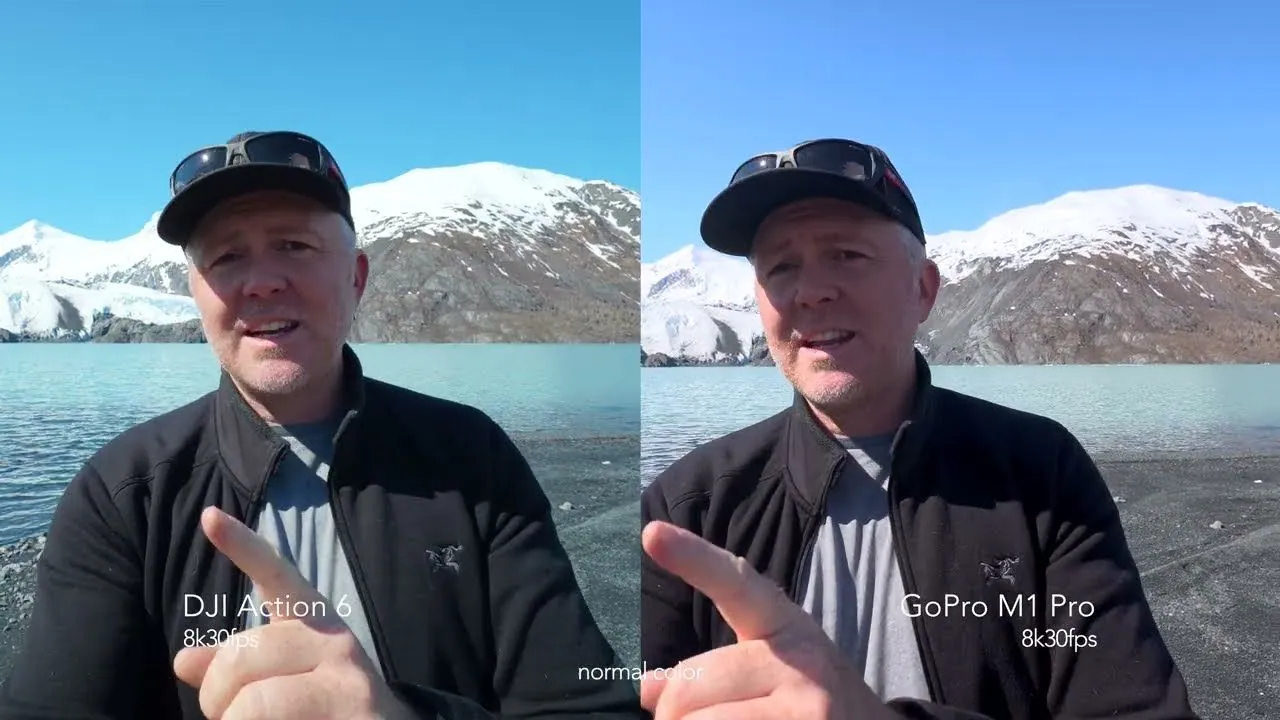
And the GoPro has this new 1-inch sensor that is capable of doing 8K up to 30 if you get the Mission 1. If you get the Mission 1 Pro, then you get 8K up to 60 frames a second. And that’s basically the only difference — some frame rates between the Mission 1 and the Mission 1 Pro — but both of these cameras film some pretty good-looking 8K imagery. However, when you put them side by side, the GoPro definitely pulls out quite a ways ahead. It just looks much more detailed. There looks like actual detail in the image and it looks really good.
And if you look at these images here, you can really see it in the background. Back at the glacier, back in the mountains, the trees, leaves on trees, all of that. It really showcases just where GoPro’s image quality is still class leading in these sorts of cameras. It just has a lot more information and a lot more detail. Not that the Action 6 is terrible, but you put them side by side and you can definitely see a difference. Now, part of this has to do with GoPro’s bit rate.
Bit rate gives you a lot of information in those fine details and especially when it’s moving fast. So, gravel, sand, leaves, all of that — your bit rate will really show up there. And while the GoPro is giving you up to 240 megabits a second, the Action 6 is limited to 120 megabits a second. And when you put them side by side, that’s when you really see a very large difference. But also, I was surprised to see a pretty big difference in dynamic range, too.
The GoPro is definitely leading the pack here where it has a just really great amount of dynamic range for a camera of this size. I mean, it’s really impressive. And most of that so far has been filmed in the normal color profile. Both of these cameras do offer 10-bit log profiles, which is really important if you want to color grade and match up. The Action 6 has D-Log M, which is a fine color profile, a flat color profile. You can do a lot with it to color grade.
D-Log M vs GoPro Log 2
And then the GoPro Mission 1 has GoPro Log 2, which is an extremely flat log profile that color grades exceptionally well and gives you a ton of leeway and also gives you the most amount of dynamic range that you’re going to get with this camera.
Now, if you’re going to be shooting in the normal color profiles, the Action 6 does have what they call an HDR and automatic HDR mode and it does a pretty good job, but it tends to clip highlights a little too quick where the GoPro does have the option to shoot in HLG HDR if you want to shoot in a wide dynamic range color space. The Action 6 does not have that option.
HLG vs HDR
One thing is that GoPro offers HLG HDR. So, this is the HDR mode of the GoPro. Pointed straight at the sun. Curious to see how that’s looking.
Low Light Comparison
But then that brings us to low-light performance. And again, here I feel like they’re pretty neck and neck, especially if you’re shooting in their low-light modes. The GoPro does a great job and this is something that typically GoPro has done horrible at in the past, but GoPro has definitely caught up and maybe even passed a little bit any other action cameras on the market as far as low-light performance. It just looks really solid, really clean, and really good.
Now, one of the ways that the Action 6 does beat the GoPro in low-light is that it has a variable aperture that can open up to F2 where the GoPro is fixed at F2.8, but honestly, I didn’t see a huge difference between the two in the little bit of low-light testing that I’ve done.
Slow Motion Comparison
But that brings us to slow motion. And here again, like GoPro is again leading the pack like they used to many years ago, but now they’re leading the pack again with slow motion features because you can film 4K up to 240 frames a second. You can film 1080p up to 480 frames a second if you want to, like, endlessly, but also you can use their super boost mode which gives you 10-second clips of true 1080p at 960 frames a second, which is insane.
Now, the Action 6 was supposed to have a mode where you could do 1080p at 240 frames a second and then push a button and it would slow it down to 960 frames a second, but I’ve never had that work on my Action 6. I’ve never been able to get it to work and these are all on the latest firmware.
So, what you’re seeing here is from the Action 5, but the GoPro definitely is just way ahead of everybody else in the pack as far as action cameras and slow motion. It is insane. Now, the 1080, yes, it looks a little soft and yes, it’s not quite as good as the 4K, obviously, dynamic range-wise, but it is usable with a little bit of image work in post and a little bit of, you know, sharpening and some other work — it does turn out to be decent.
But again, like it’s not going to approach something of like a dedicated high-speed camera. In addition to slow motion, they both offer hyperlapses, time lapses, all of those sorts of things. If you want to, GoPro gives you the option to be able to do a hyperlapse where it creates a video and then also saves you the raw photo files if you want to do that, up to 8K, where the Action 6 only gives you the option for up to a 4K time lapse and you don’t get the option to save the raw files.
Hyperlapses and Timelapses
Another thing I was curious to test is the different options that each camera gives you as far as built-in fields of view. And this is the linear lens. Let’s go a little wider and see what we can do there.
Field of View Options
And then this is the natural wide on the Action 6 and the wide on the GoPro Mission 1. And then this is ultra wide on the Action 6 and super view on the Mission 1. Now, something I found interesting is that both of these cameras do offer a subject tracking mode and you can do it in vertical or horizontal, but the GoPro gives you a little bit more options.
Subject Tracking
The Action 6 is limited to 2.7K output on those, either in vertical or horizontal, where the GoPro actually gives you a full 4K image on those both in vertical and horizontal. Now, if you’re going to see the difference posting this stuff on social media, it’s a little harder to say, but it is nice to have the option to give just a little bit of movement to a scene if you want to.
Photo Comparison
And then we come to photos. Now, here again like the Action 6 takes some great photos. It really does look nice, but GoPro is beating pretty much everybody else in this area because it gives you up to 50 megapixel stills where the Action 6 is limited to about 48 megapixel photos, and that’s only if you take photos in the 4×3 modes. But again, you put the photos side by side like honestly, the way that GoPro handles their image processing just looks better. It just does.
And we’ll get into some other reasons why the Action 6 beats GoPro in just a little bit, but overall as far as an image processing pipeline and the final product that you get out of the camera, GoPro’s winning hands down. It just is. But then we come to one of the areas that the Action 6 definitely is still beating the GoPro, and that’s audio. And then we have the on-camera audio test.
Audio Comparisons and Options
Now, the cool thing is that all of these camera systems have their own microphones that you can add in and go direct to camera, which we will try out in just a second here, but that pretty much cleans up any audio. But right now we’ve got some wind coming from over there, and I’m curious to see how these three do. This is the GoPro with its auto wind noise reduction on and the microphone setup that it has built in. This is the Action 6 with its auto noise reduction on with the, you know, built-in front-facing microphone I assume.
But the cool thing is that all these camera makers are now coming out with their own microphone systems. So right now I’m using the DJI Mic Mini with the Action 6, which is direct plug-and-play or direct connect, so there’s no external receiver or anything like that. GoPro historically, you could connect via Bluetooth, but the quality went way down. The audio quality went way down because of the Bluetooth connection, but they have allowed USB-C.
So, now you can plug in a USB-C compatible microphone and go straight into the camera. I’m very curious to try the GoPro mic system out. If it’s direct connect, that would be amazing. The media mod also looks pretty incredible with a little shotgun mic on top. But, we’ll see. But this is, yeah, the DJI Mic Mini plugged directly into the GoPro.
And, you know, you’ve been hearing both of these with the direct connection, which is the way to go with if you want clean audio with no wind. That is absolutely the way you have to go. And when it comes to audio, a huge advantage GoPro has, and again, this is sort of aimed at those pro-level users, is that not only can you capture stuff directly plugged in with USB-C, but you also have the option of raw audio or 32-bit float internal recording, or you can also have it record four tracks.
Internal 32-bit Float and 4-Channel Audio
So, what you plug into the USB-C will go to track one and two, and then track three and four will be the stereo mics included on the front of the camera here, so you can still capture that ambience if you want to. But the 32-bit internal recording is a huge win for pro-level users.
But then we come down to physical size, usability, user interface, accessories, and in some of these ways, at least right now, at the time of this recording, the Action 6 is definitely still beating GoPro because you have things like a macro lens that will allow you to get close-up shots where the GoPro has a fairly limited close focus distance of about 2 ft or so, from what I understand, at least from my testing.
Physical Size, User Interface, and Accessories
Where the Action 6, because of the macro lens, you can obviously get a lot closer, but it also has a fairly limited close focus distance without the macro lens. And I think the second biggest area, aside from audio being the first, where the Action 6 beats GoPro still is that the Action 6 has 50 GB of built-in internal memory.
Internal Memory
And the amount of times that that has saved me because I forgot an SD card or whatever has been more than I care to admit. But that internal memory really is something nice to have. And then if we come to battery life, the Action 6 has up to about 4 hours of battery life where the GoPro has up to a little over 5 hours of battery life depending on the modes that you’re recording in. But I think the biggest way that GoPro has made improvements is that now you are able to fast charge GoPro batteries in the GoPro or in the multi-charger.
Battery Life and Recharging
And that has always historically been something that the Action 6 or the Action series beat GoPro on, but now they’re pretty neck and neck. About 20 minutes to recharge to 80% on the GoPro, about 18 minutes to recharge to 80% on the Action 6. So, very close there, but also the GoPro battery is slightly larger. So, it makes sense that it takes a little longer. And then about 30 to 40 minutes to fully charge the GoPro, about the same to fully charge the Action 6.
The Action 6 is still definitely a little faster on battery recharging, but GoPro having fast charging on the GoPro now is a massively welcome change. And on battery performance, now I haven’t done any overheating tests. I don’t really deal with that here in Alaska, but the GoPro typically had real issues in very cold water or very cold weather.
And in my testing in water, the GoPro has had no issues with battery life. And running them side by side, they both seem to operate about the same even though I was putting them in this very frigid water for quite a bit of time to get the shots. They neither one of them had issues, whereas before GoPro would definitely have had an issue here. So, it seems like GoPro’s made massive improvements there.
Size Comparison
And then we come to size. And yes, the GoPro is definitely a larger and slightly heavier camera. It just is. I will say a couple of things about it. The screen on the GoPro is a little bigger now, which is really nice and a very welcome change. It’s plenty bright.
In fact, most of the times it was more than bright enough. One big difference between the Action 6 and the GoPro is that the Action 6 front screen you can actually move it or use it to change settings if you want to or to view media. Where the GoPro you cannot do that. But something that GoPro has done exceptionally well on the Mission 1 Pro is these buttons. And if you can see, like, they’re quite a bit larger. They’re quite a bit more raised. That’s a little hard to tell right there, but they are so much easier to push and so much more responsive. So I think everybody needs to take a note from GoPro on how to design their buttons.
These are fantastic. And then we come down to menu systems, which both of them you swipe down and you have sort of quick access menus. But they both offer a version of voice command so you can tell the camera to, you know, start recording or whatever you might want to do there. They both have these quick menu systems and then you can get into deeper preferences.
Menu Systems
GoPro offers cloud upload where the Action 6 does not offer cloud upload, but you can set it up to upload directly to a NAS system if you wanted to do that.
And they both will output USB-C to HDMI video, which could be very useful. I’ve used that a lot on the Action series actually, where I needed to output video live to a video village or something like that. And the Action 5 / Action 6 was the camera that did that. So I’m glad to see that GoPro has done that because a lot of people I’ve worked for in the past would prefer the image quality or the image profile that GoPro gives them over something else, but getting video out was always an issue there.
Now that will be coming in a future GoPro update in the next few months, but it is coming and I’ve seen it in action like at NAB and it works exceptionally well, which is super cool. Now one thing GoPro can do that the Action 6 can’t unless you buy the accessory for it is it has a built-in GPS, so you can overlay GPS information if you want to.
GPS Information
Voice and Gesture Control
Now, while both of these cameras offer voice commands, the Action 6 actually offers a gesture command or control, which is super cool. If you just want to use your hand to control the Action 6, you can. And one of the biggest ways that GoPro has been the king and still blown every other action camera out of the water on the market is using GoPro Labs. You can download special firmware, install it on the GoPro, and then use QR codes on your phone to tell the GoPro what you want it to do. And this includes things like time code.
Where GoPro Beats Everyone (GoPro Labs)
You can have it do up to 300 megabits a second if you want to really get a lot of bit depth in there. And you can do all kinds — I mean, there’s an insane amount of things that you can make this thing do, like wake up once every 24 hours and take a photo to create a really long time lapse if you wanted to. Or, you know, turn on at 3:00 in the morning and start a night star lapse or something like that if you want to. Like, it’s an insanely powerful tool if you really want to go down the deep rabbit hole of what you can make a GoPro do.
But then we come down to what is probably the biggest determining factor, and that’s price.
Price
The Action 6 comes in right around $430, $450 for the camera by itself with one battery. And you can get the Mission 1 for $600. Although, if you’re a GoPro subscriber, you can get $100 off, or the Mission 1 Pro for $700, so $600. But also, I have a code down there, Ranger 10. If you use that at checkout, you should save an additional 10%. But what did you think, especially of the image quality? Let me know in the comments below.
But next, you’re going to want to watch this video here where I compare the Ace Pro 2 and the GoPro Mission 1 Pro. I’ll see you over there. As always, if you have questions, ask me in the comments below or join my live stream, which happens most Wednesday nights at 4:00 p.m. Alaska time, 8:00 p.m. Eastern, where we can have a little more of a conversation. I can answer questions that maybe I didn’t get to in this video. I’ll see you guys soon in the next one. Cheers.
This article is based on a video from Jake Sloan on YouTube. You can find more of Jake’s work on his YouTube channel and read his other contributions on his DroneXL author page.


