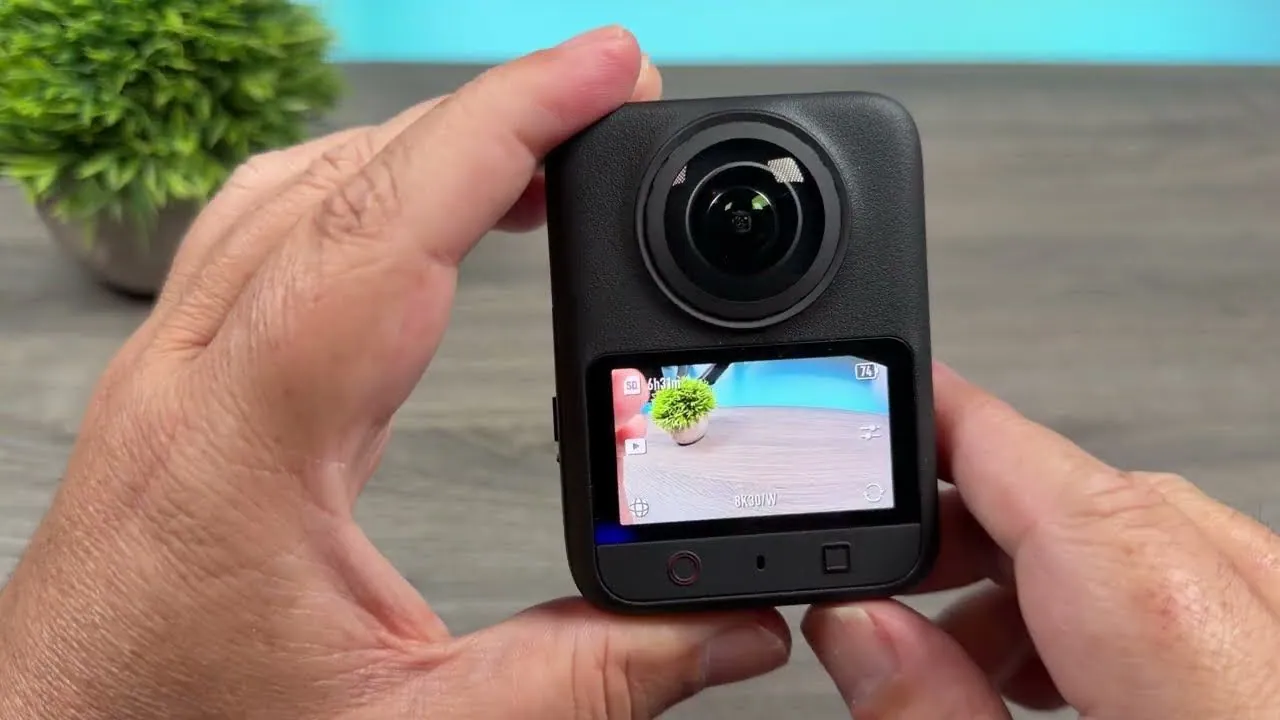
The DJI Osmo 360 II packs quite a few upgrades over the original DJI Osmo 360. The biggest is probably the new 1-inch type sensors, which enable up to 8K at 60 frames per second and up to 14.5 stops of dynamic range. I want to say thank you to DJI for sponsoring this video. Now let’s see how this camera holds up in real-world use.
How 360 Cameras Work Differently
If you didn’t know, 360 cameras operate very differently from normal cameras. That gives you a lot of options for how you work with them, but you also need to understand how to use them. First, 8K60 isn’t 8K like a traditional action camera. It’s 8K for an entire 360-degree sphere, because a 360 camera captures everything around it.
That makes 360 cameras fantastic for action sports, or anything where you don’t know exactly where the action is going to happen but you know something will happen and you want to make sure you capture it. Because the camera records the full sphere, you know you’ll get whatever is happening around you at the time.
They’re also good when you can’t think about where the camera is pointed and just want to make sure you capture the moment. That includes what I’m doing today, running around in forests and on rocks where I have to concentrate on where I’m putting my feet. It also includes behind-the-scenes cameras, and 360 cameras work great for that.
It does take a little extra work, and it’s definitely an extra step, but it lets you get some really cool shots where the selfie stick disappears. You get a hovering, drone-like follow camera without actually needing a hovering follow drone. That’s especially nice for high-action sports like skiing or snowboarding.
Spotlight Follow Tracks You in the Camera
If you don’t want to do that, the Osmo 360 II has Spotlight Follow. It tracks a subject on the camera, like it’s doing with me right now, and the camera follows you around while you talk to it. You’re still capturing a full 360-degree sphere, so you can reframe in post and grab another angle if you want, which is super useful.
One of the cool things about Spotlight Follow is that you can register a subject, so the camera automatically knows to track you in that mode. That’s super helpful when you need the camera to pick you back up after you go behind an object, or when you’re in a crowd of people.
It’s basically like DJI took the tracking software in the Studio and in the app and built it into the camera. That removes a huge roadblock for 360 cameras.
Single Lens Mode for Regular POV Shots
You can also use Single Lens Mode with either the front or the rear lens. That’s really great if you want to attach the camera to a backpack strap, a bike helmet or a snowboarding helmet and just get a regular POV shot.
You do get a really wide field of view, which could be good or bad, but it’s nice to have the option. That’s exactly what I’m using right now, and you can film in Single Lens Mode at up to 4K 120 frames per second.
New 1-Inch Type Sensors
One of the biggest upgrades to the Osmo 360 is the new 1-inch type sensors, which enable up to 14.5 stops of dynamic range. In a side-by-side with the original Osmo 360, you can definitely see a little bit better dynamic range. It’s about a stop more than the original, and that’s definitely an improvement.
Looking at the footage side by side, I’d also say there’s a bit better detail. I’ll assume that’s due to the new sensors and the new lens design that had to go along with them. It just looks a little bit better.
8K60 and New High Frame Rate Options
With those new sensors and the new hardware DJI has put in the Osmo 360 II, we now get up to 8K at 60 frames per second in 360 degrees. The new processing power also brings new high frame rate options.
In Slow Motion mode, you can now film up to 4K at 240 frames per second, which is insanely slow motion. If you want to use Vortex mode, you can film in 8K at up to 120 frames per second, which gives you some pretty cool slow-motion options.
Low Light Has Gotten Pretty Good
One of the big benefits of the new sensors is improved low light. That also comes down to the hardware inside and the AI algorithms that process the image, because the low light has gotten pretty freaking good.
It was getting too dark to see when I tested it, about 30 minutes after sunset. You still need some ambient light, like the car lights around me, but getting any usable low light out of this is really impressive. It wasn’t very long ago that 360 cameras, and action cameras in general, were total garbage in any sort of low light.
Why Choose a 360 Camera Over an Action 6?
360 cameras are great at getting kind of impossible angles, the ones you just can’t get with any other action camera. That includes follow-camera shots and fake drone shots if you want them. 360 cameras also make great behind-the-scenes cameras, because you can capture shots of yourself just enjoying your hobby, especially with the new tracking options.
If you like hiking and photography, you can get shots of yourself doing your favorite hobbies without really having to think about the camera.
Another reason to get a 360 camera is if you film for wide and vertical at the same time, because you can reframe the shots and get a really great field of view in either orientation. If you film for YouTube long form and also Shorts or Reels on TikTok or Instagram, a 360 camera is great.
AI Stitching and User-Replaceable Lenses
A couple of other upgrades include the new AI stitching, which is supposed to give better stitch lines. In the video, I walk right along the stitch line at about 5, maybe 6 feet from the camera, so you can judge how it looks.
The biggest upgrade DJI has made, and probably what all of us have been asking for since the original Osmo 360 came out, is that the Osmo 360 II now has user-replaceable lenses. That’s super useful, because the way these cameras are built makes their lenses very prone to getting damaged. You can replace the lenses yourself, or send the camera to DJI to have them do it for you.
The replacement process is super easy and straightforward. If you get a replacement kit, it comes with everything you need. Just make sure you’re in a clean room when you do it.
Clean Audio With DJI Mics
The Osmo 360 II works with the Osmo Audio system, which means you can use a DJI Mic 2, Mic 3, Mic Mini, Mic Mini 2 or Mic Mini 2S, pretty much all of the DJI mics that have come out in the last few years. That gets you good, clean audio even with a fair amount of wind.
There’s a fair amount of wind up here, and it’s blowing pretty good, but because I’ve been using the Mic 3 for this entire video, the audio has stayed clean. That’s super important if you like to vlog with this camera or capture behind-the-scenes content where you’re talking to the camera about what you’re doing.
10-Bit D-Log M, 16K Time-Lapses and 120MP Photos
The Osmo 360 II gives you 10-bit D-Log M, so you can color grade and match this footage to whatever other cameras you’re using. Almost all of this video was filmed in D-Log M, partly because it also gives you the maximum amount of dynamic range. If you just want to film in normal mode, it’s still 10-bit, you still get great colors and it looks good. It depends on what you want to do with the footage afterward.
You can also film time-lapses up to 16K, which is insane, but also very, very good looking. And you can take still photos up to 120 megapixels. They look pretty dang good to me, and you can reframe them just like you would 360 video.
105GB of Internal Storage
You also get 105GB of internal storage, so if you don’t want to use SD cards, or you forget one, you don’t have to worry about it.
I still recommend using an SD card, because if something happens to the camera, there’s a better chance you’ll be able to get the footage off. But if you do use the internal storage, transfer speeds off the camera are incredibly fast.
If you have questions, ask me in the comments on the video, or join my live stream, which happens some Wednesday nights at 4:00 p.m. Alaska time, 8:00 p.m. Eastern, if I’m not out scrambling up some giant rock in British Columbia.
For more on the camera’s rollout, see our coverage of the Osmo 360 II’s global launch.
This article is based on a video from our YouTube partner Jake Sloan. Watch the full video on the Jake Sloan YouTube channel, and find more of Jake’s work on his DroneXL author page.